ERP Connectors
This manual provides the information for AEs, SPs, Project Managers, DTCs, and Consultants on the ERP Connectors that are built for the AR, AP, and ERP Integrations implementations.
|
|
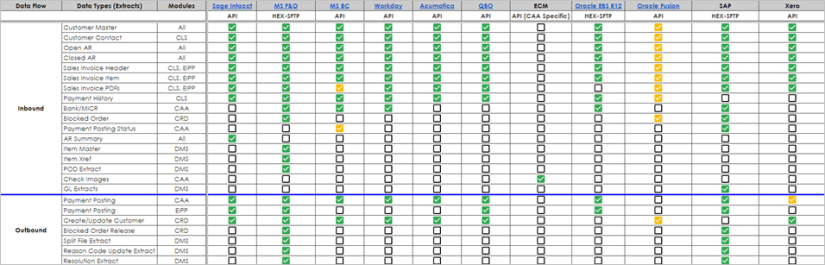
Note HEX is referred to HighRadius Extractor and is translated as SFTP based transmission method. |

ERP Connectors Scope Matrix
|
|
Note
|
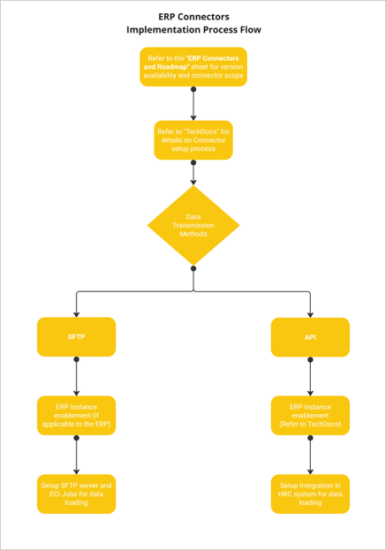
ERP Connectors Implementation Process Workflow
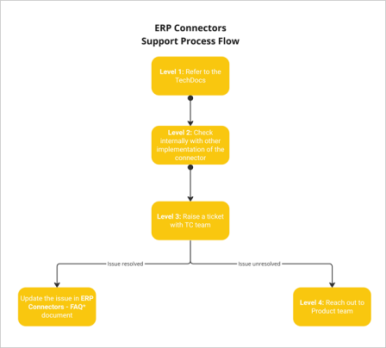
ERP Connectors Support Process Flow
|
|
Information If the issue is resolved, update it in the ERP Connector - FAQ document. |

|
|
Note Some hyperlinks and their drill-down documents can have restricted access only to HighRadius. Contact the HighRadius Account Manager for access. |
UI Overview
Navigate to Administration Menu > Integrations > Manage Integrations.
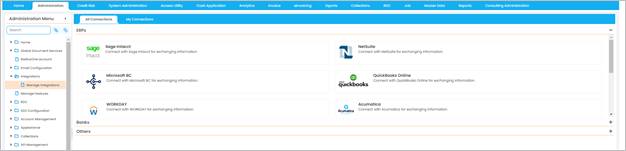
The Manage Integration screen consists of two tabs, All Connections and My Connections.
-
All Connections - This tab displays all the ERP connectors available for the account. To configure the HighRadius Integration details for a specific ERP, click the specific ERP tile.
For more details on the HighRadius Integrations for the ERPs, refer to the following sections:
-
My Connections - The My Connections tab allows you to add, edit, and delete any ERP integration. Additionally, you can add, edit, and delete the Data Type and cron of an existing integration.
Fore more details, refer to Editing ERP Integration Settings.